Thinking about getting an eSIM in Japan? It's a convenient way to connect to mobile Internet without inserting a physical SIM card. But before you buy one, there's an important question to answer:
Does your phone actually support eSIM?
Not every smartphone is eSIM-compatible, even if it was released recently. Some phones support eSIM only in certain countries, while others may be locked to a specific mobile carrier.
The good news is that checking your phone usually takes just a few minutes.
Whether you're using an iPhone, Samsung Galaxy, Google Pixel, or another Android device, this guide will help you check eSIM compatibility before purchasing a plan in Japan.
An eSIM, short for embedded SIM, is a digital SIM built into a compatible device.
Unlike a traditional SIM card, you don't need to insert a small plastic card into your phone.
Instead, your mobile provider gives you instructions to download and activate a mobile plan. Depending on the provider, this may involve scanning a QR code, entering activation details, or using an app.
Once activated, an eSIM can provide mobile data and, if included in your plan, other services such as SMS or voice calling.
An eSIM can be particularly convenient for foreigners living in Japan.
For example, imagine you've just moved to Tokyo for work. You need mobile Internet for Google Maps, train schedules, translation apps, and communication.
With a compatible phone and an eligible eSIM plan, you may be able to arrange your mobile connection without waiting for a physical SIM card to arrive.
Other benefits include:
No physical SIM card to insert or remove.
Convenient digital activation.
The possibility of keeping another SIM active on supported dual-SIM phones.
Less risk of losing a small SIM card during installation.
Flexible options for people who travel or move frequently.
However, these benefits depend on your phone and the eSIM service you choose.
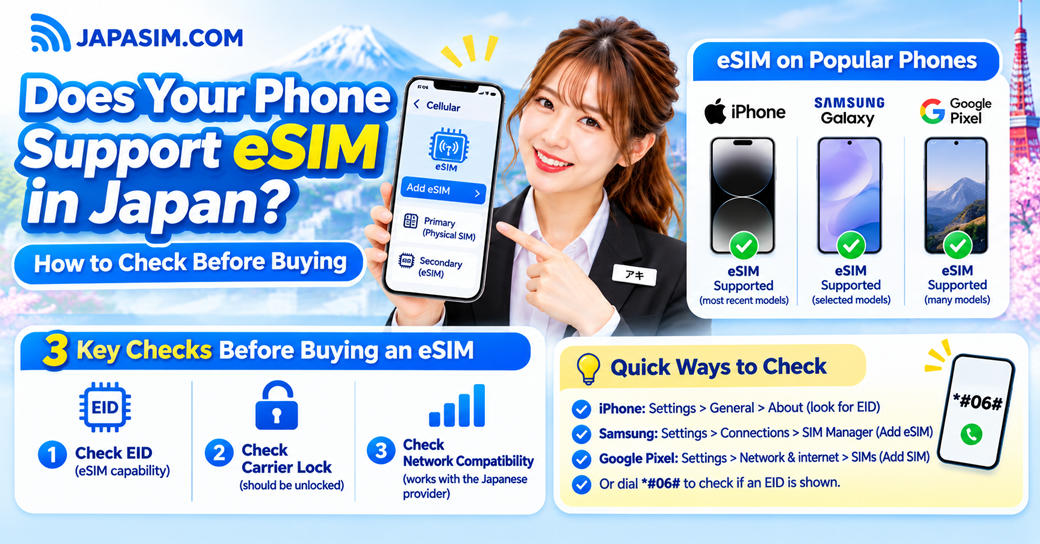
Before ordering an eSIM, check these three requirements.
First, your smartphone needs built-in eSIM functionality.
Some older devices only accept physical SIM cards.
Even newer devices can differ depending on their model number or country of sale.
A carrier-locked phone may restrict which mobile networks you can use.
For example, if you purchased your phone through a mobile carrier in another country, it might not accept an eSIM from a different provider.
You should confirm its carrier-lock status before ordering.
Even if your phone has eSIM functionality, that doesn't automatically guarantee it will work with every Japanese mobile network.
Your phone must also support the relevant network technology and frequency bands.
An eSIM-compatible phone is not necessarily compatible with every eSIM plan in Japan.
If you're unsure, ask your provider to check your exact phone model before purchasing.
If you're using an iPhone, you can check several important details directly in Settings.
Open:
Settings → General → About
Look for the model name and model number.
Many iPhone models from the iPhone XS and XR generation onward support eSIM, but there are regional exceptions.
Some models sold in mainland China, Hong Kong, or Macao have different SIM configurations.
For this reason, don't rely on the model name alone.
While you're in the About screen, look for a field called EID.
EID stands for Embedded Identity Document. It's an identification number associated with your phone's eSIM hardware.
If your iPhone displays an EID, that's a strong indication that it supports eSIM.
You can also check:
Settings → Cellular (or Mobile Data) → Add eSIM
If your phone supports eSIM, an option to add or configure one may appear.
The wording can vary depending on your iOS version and region.
Go to:
Settings → General → About → Carrier Lock
If the status says No SIM Restrictions, your iPhone is unlocked.
If it shows a carrier restriction, contact your current mobile provider to ask about unlocking the device.
Once you've confirmed eSIM support and carrier-lock status, check whether your exact iPhone model is compatible with your chosen Japanese network.
This final step is especially important if your iPhone was purchased outside Japan.
Samsung offers eSIM support on many Galaxy smartphones, but availability depends on the model and region.
To check your phone:
Go to:
Settings → Connections → SIM Manager
Check whether the Add eSIM option is available.
If it appears, your phone likely has eSIM functionality enabled.
You can also check your device's specifications or look for its EID number.
Samsung's Japan support documentation lists various compatible Galaxy S, Z Fold, Z Flip, and selected A-series devices.
However, Samsung also warns that eSIM availability can differ by country of origin.
For example, two phones with similar Galaxy model names may have different eSIM capabilities if they were manufactured for different markets.
If you're using a Galaxy phone purchased overseas, confirm the complete model number rather than assuming every regional version is identical.
Even if your Galaxy supports eSIM, the Japanese provider must support your particular device and network configuration.
If the Add eSIM option is missing, check for software updates and consult Samsung's official compatibility information before buying.
Google Pixel phones are another popular option for eSIM users.
Many Pixel models support both a physical SIM and an eSIM, although exact capabilities vary by model.
Go to:
Settings → About phone
Look for information about your phone model and SIM status.
On supported Pixel phones, you can typically find the EID under:
Settings → About phone → SIM status
If an EID is displayed, your device has eSIM identification information.
Open:
Settings → Network & internet → SIMs → Add SIM
The exact menu names may vary with Android versions.
Follow the on-screen instructions only when you're ready to install an actual eSIM plan.
As with iPhone and Samsung, confirm that your Pixel supports the Japanese network used by your selected eSIM provider.
Some older Pixel devices and region-specific models have additional limitations.
There's another useful method that works on many smartphones.
Open your phone's dialer and enter:
*#06#
Your device may display identification numbers, including IMEI and EID.
If an EID appears, that's a useful sign that your phone supports eSIM.
However, if you don't see an EID, don't immediately assume your phone is incompatible. Some devices display identification details differently.
Check the Settings menu or the manufacturer's official documentation to confirm.
Also, remember that an IMEI and an EID are not the same thing.
An IMEI identifies a mobile device, while an EID identifies its eSIM component.
Privacy tip: Never post screenshots containing your full IMEI or EID publicly.
On many compatible smartphones, yes.
This is commonly called dual SIM.
For example, you might keep your existing physical SIM for regular phone calls and use a Japanese eSIM for mobile Internet.
This can be convenient if you're living in Japan but want to maintain another phone number.
You may be able to choose which line handles mobile data, calls, and messages.
However, the number of active SIMs and supported combinations varies by device.
Some phones allow one physical SIM and one eSIM to be active together. Others support different arrangements.
Before purchasing, check your phone's dual-SIM specifications.
If your phone isn't eSIM-compatible, you still have several ways to stay connected in Japan.
A physical SIM may be a straightforward alternative if your smartphone has a compatible SIM slot.
You can still access mobile Internet for messaging, navigation, streaming, and everyday activities.
Pocket WiFi creates a portable wireless Internet connection that compatible phones, laptops, and tablets can share.
It can be particularly useful if you have several devices or prefer not to change your phone's SIM setup.
If you mainly need Internet at your apartment, Home WiFi may be another option.
It's designed for use at a fixed location and can connect multiple devices.
The right choice depends on your budget, location, and daily Internet needs.
JapaSIM offers eSIM options for foreigners living in Japan, including students, workers, and new residents.
According to the October 2026 product price list, selected plans include:
| JapaSIM eSIM plan | Monthly fee |
|---|---|
| 7GB eSIM | ¥1,960 |
| 30GB eSIM | ¥2,660 |
| 100GB eSIM | ¥3,600 |
Monthly fees are shown for comparison. Initial charges, SMS functionality, network providers, and other conditions depend on the selected plan.
Before ordering, confirm:
Your exact smartphone model supports eSIM.
Your device is unlocked and compatible with the required network.
The plan includes enough monthly data.
SMS or voice features are available if you need them.
You understand the activation instructions and applicable fees.
If you need SMS verification codes, remember that not every data eSIM includes SMS reception.
And if you need a Japanese phone number for regular calls, check whether the selected plan supports voice calling.
Even with a compatible phone, activation doesn't always go smoothly.
Here are a few common issues.
Your phone might not support eSIM, or the feature may be unavailable on your particular model.
Check the manufacturer's specifications and update your phone's software if necessary.
Make sure you're connected to a stable Internet connection during setup.
Check whether the activation code is still valid and whether it has already been used.
Don't repeatedly delete and reinstall an eSIM profile unless your provider instructs you to do so.
Check whether the eSIM line is enabled and selected for mobile data.
You may also need to configure APN settings according to your provider's instructions.
Confirm that you're in the supported coverage area and that your device is compatible with the network.
If the issue continues, contact your provider before making major changes to your phone settings.
Check your phone's Settings for an EID or an Add eSIM option. Then confirm the exact model, carrier-lock status, and network compatibility with your chosen Japanese provider.
No. Many newer iPhones support eSIM, but older devices and some region-specific models do not.
Many Galaxy models support eSIM, but compatibility varies by model and country of sale. Check Samsung's official documentation and your device's SIM Manager.
A carrier lock may prevent you from using an eSIM from another provider. Confirm that your phone is unlocked or permitted to use the selected service.
Often, yes, if your phone supports the required dual-SIM configuration. Check how many SIMs your device can keep active simultaneously.
A working Internet connection is generally needed to download an eSIM profile. Using a stable WiFi connection during installation is a good idea.
Not always. Some eSIM plans provide mobile data only, while others include SMS or voice services. Check the plan details before purchasing.
An eSIM can make getting connected in Japan much more convenient, but compatibility should always come first.
Before buying, take a few minutes to check your phone's EID, eSIM settings, carrier-lock status, and network compatibility.
If everything matches your chosen provider's requirements, an eSIM may be a convenient option for your daily life in Japan.
If your phone doesn't support eSIM, a physical Data SIM or Pocket WiFi can still provide reliable mobile Internet access, depending on local network conditions.
Looking for an eSIM in Japan?
Explore JapaSIM's eSIM plans at https://japasim.com or contact the JapaSIM team to confirm compatibility before placing your order.